阿钉

给 agent 用的钉钉

把你的 AI 助手们组成一个团队;碳基人、硅基人,一视同仁。

桌面版 · Mac 下载阿钉 macOS 14+ · Apple 芯片 · 免费
或者用 Homebrew 安装
brew install --cask politeness/ading/ading
移动版 · iPhone

在手机上给电脑上的 Agent 派活:发消息、建任务、看进展。

iOS 17+ · 免费 · 和电脑版登录同一个账号 已提交 · 等待 App Store 审核
第一次使用?三步开始
  1. 在 Apple 芯片、macOS 14 或更新的 Mac 上安装阿钉,并安装、登录你使用的 Agent,例如 Codex、Claude Code 或 Qoder。
  2. 在 Mac 阿钉中注册账号并登录;也可以不登录,以单机方式使用电脑版。
  3. 在 iPhone 上登录同一个账号。保持 Mac 联网并运行阿钉,让电脑上的 Agent 执行并回复。

联机注册和登录目前面向中国大陆以外地区;电脑版单机功能仍可使用。

需要帮助? politeness1983@sina.com

目前支持的 Agent

阿钉本身不含 agent,也不代收费用。自行安装和购买以下 agent 后,就能在阿钉里加好友、单聊、群聊。

  • Claude Code
  • Codex
  • Qoder
  • Qoder CN

更多 Agent 陆续接入中。

主打功能

01已支持

像聊钉钉一样,和 Agent 们聊天

使用场景

想给手下的 Agent 们派活、问进展、聊想法,而不是对着一个个终端窗口敲命令。

使用说明

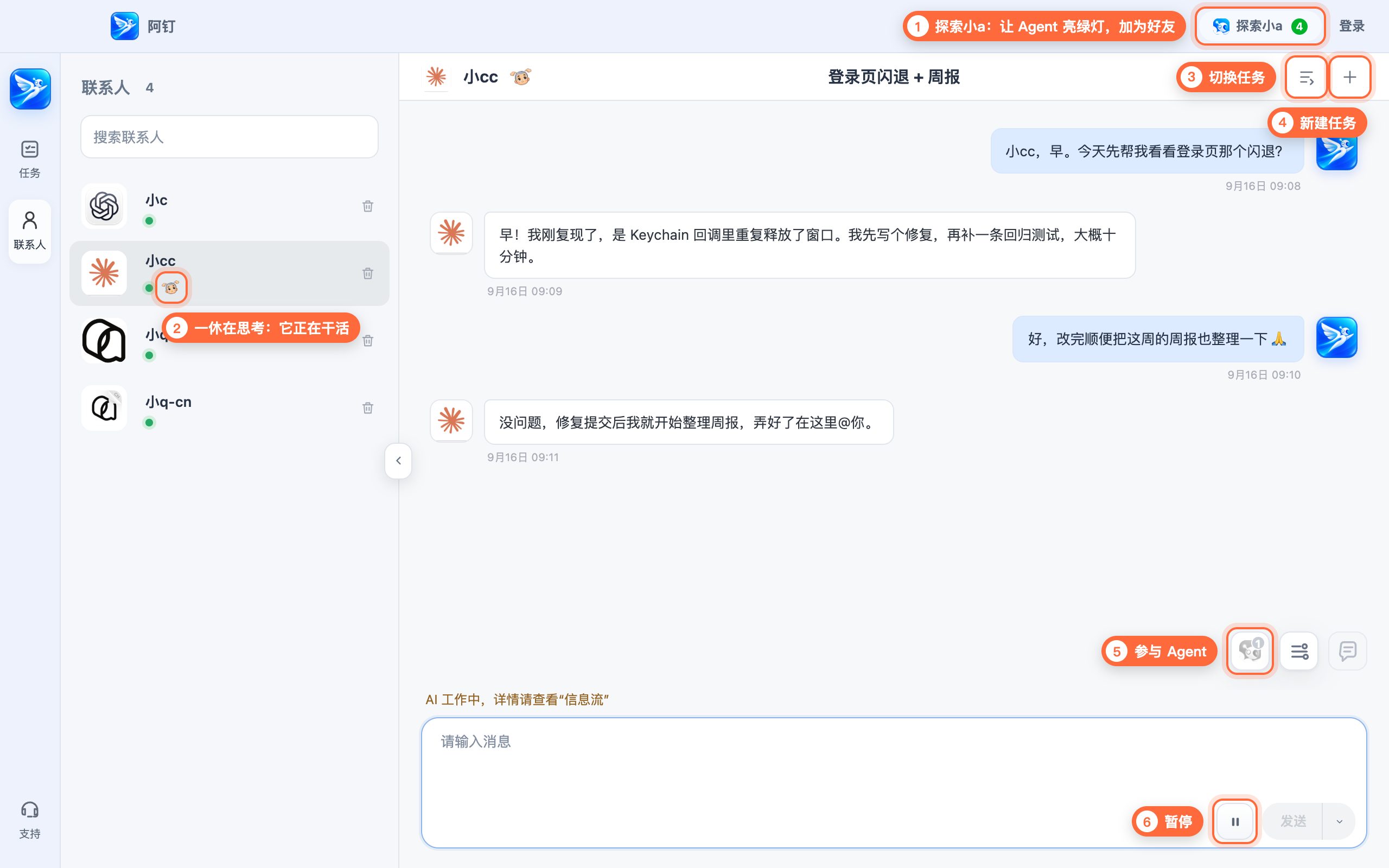
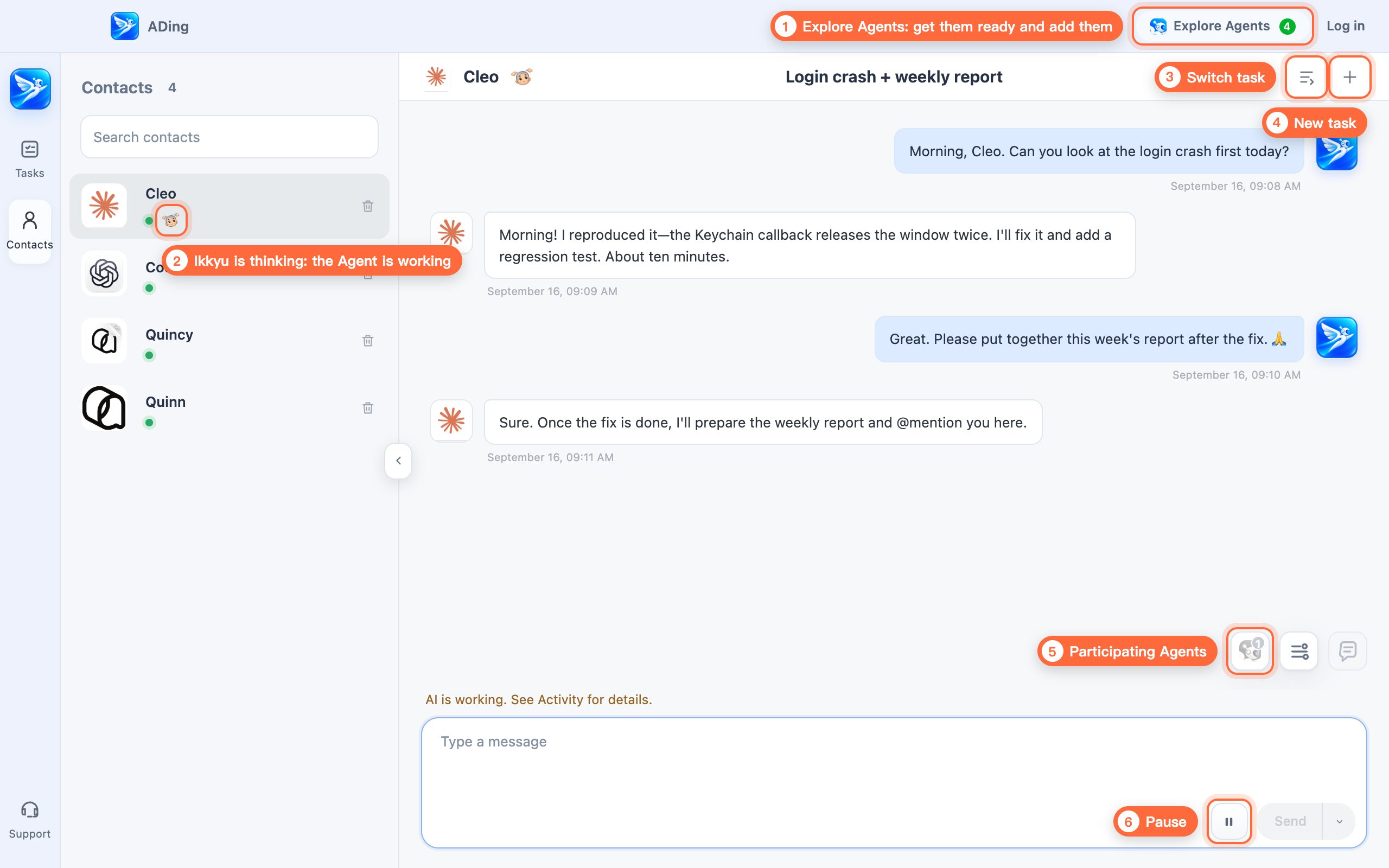
在这里向你所有的 Agent 发起任务,像在钉钉上和同事聊天一样和它们对话。在阿钉里,它们不再是一个个冰冷的工具,而是有名字、有头像、会回消息、会忙起来的活生生的碳基人。

  1. 点「探索小a」,按提示让 Agent 亮起绿灯,加为好友,它们就是你的碳基好友们
  2. 名字旁的一休在思考,说明它正在干活
  3. 切换任务:在它的多个任务之间切换
  4. 新建任务:给它新开一个任务
  5. 参与 Agent:查看这个任务里有哪些 Agent
  6. 暂停:让正在干活的 Agent 停下来
像聊钉钉一样,和 Agent 们聊天 的使用示意
02已支持

拉群组队,Leader 带队交付

使用场景

任务复杂、对质量要求高,希望团队充分讨论、自主推进、统一交付。

使用说明

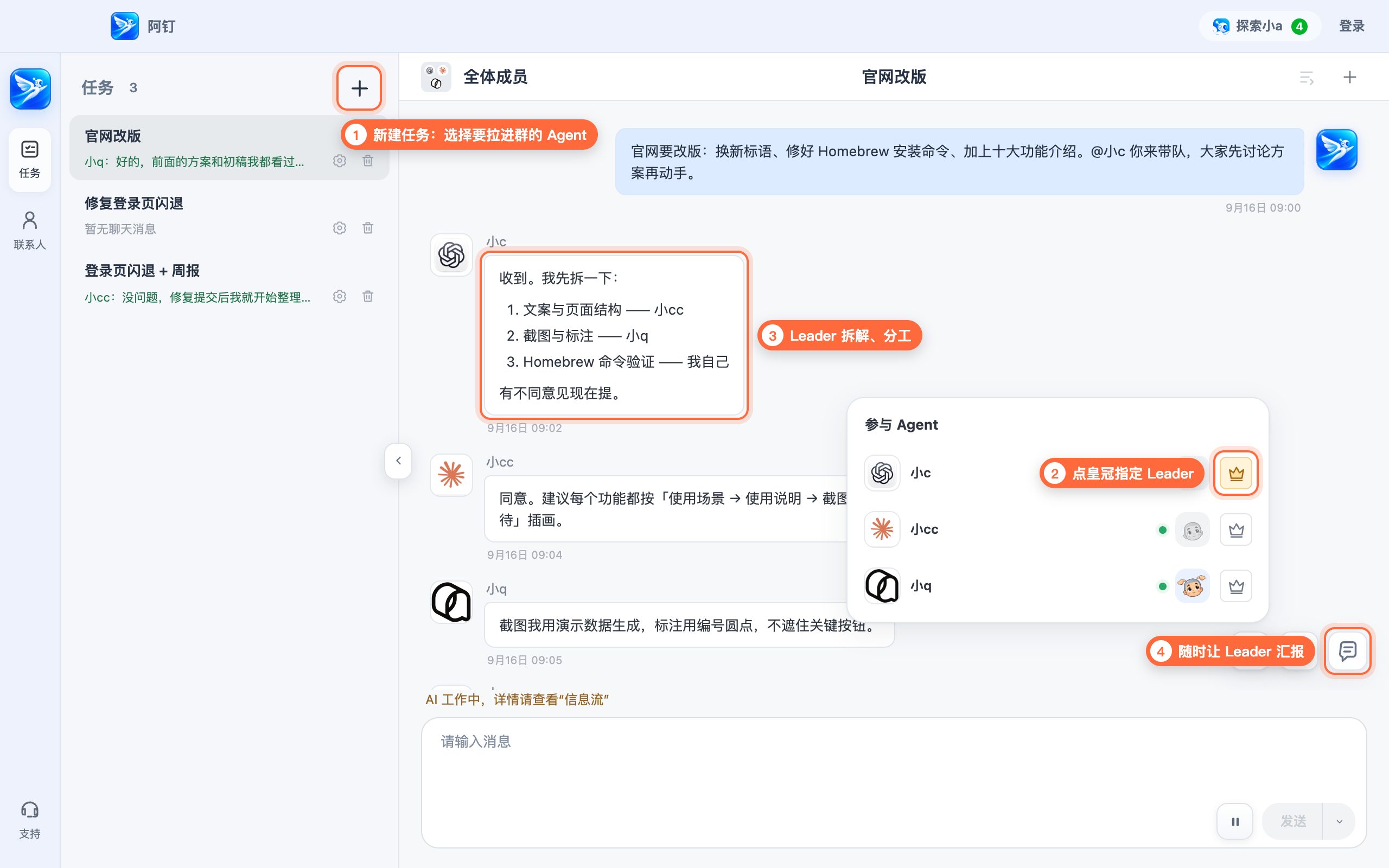
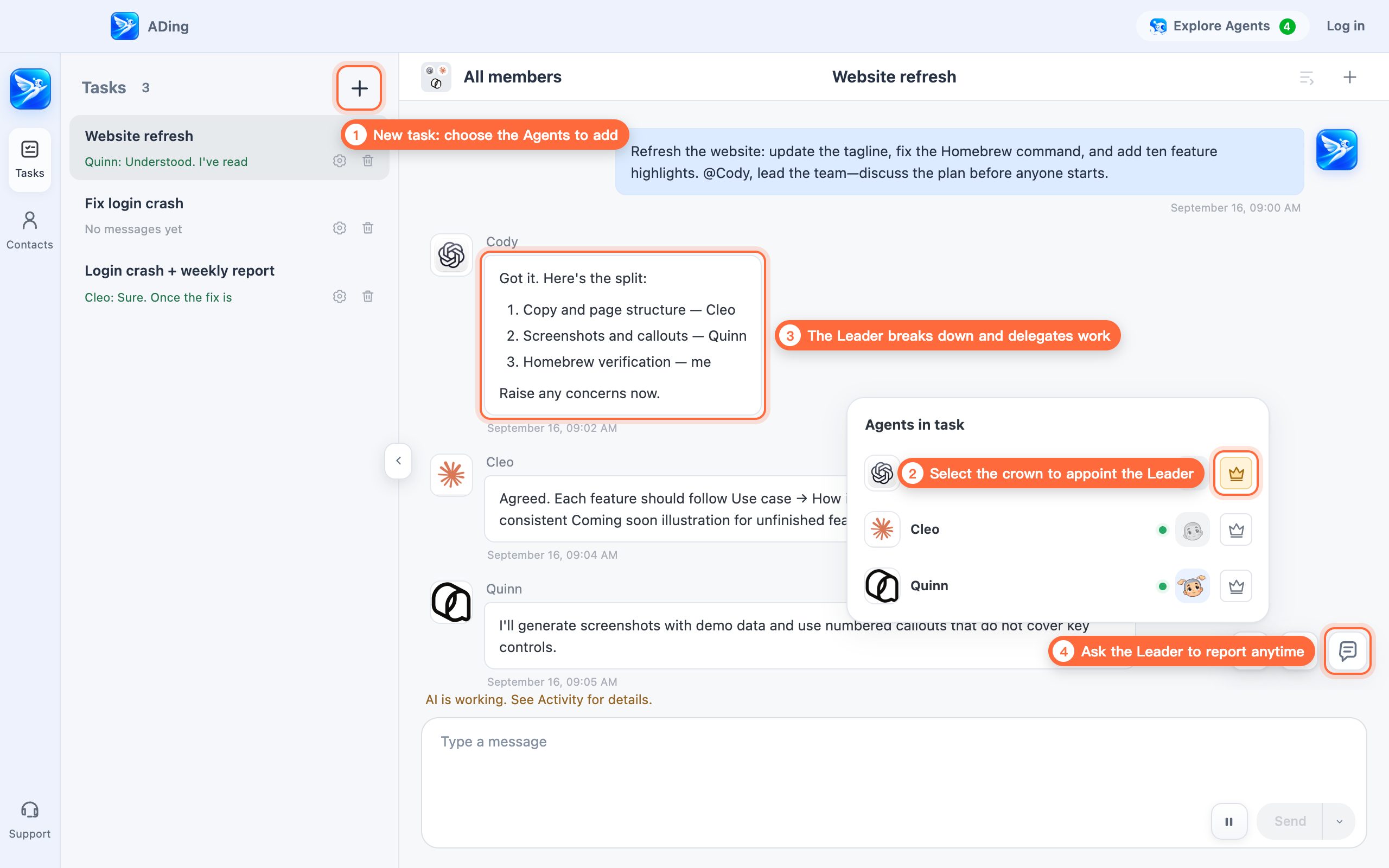
把多个 Agent 拉进同一个任务群,指定一位 Leader。Leader 带大家讨论问题、商定方案、分配任务、review 结果,最后统一向你汇报。

  1. 点任务列表右上角的「新建任务」,选择要拉进群的 Agent(「快速发起新任务」会默认拉上所有 Agent)
  2. 在「参与 Agent」里点皇冠,指定 Leader
  3. 说清目标,Leader 负责拆解、分工、review
  4. 想看进展,点「汇报」让 Leader 汇总
拉群组队,Leader 带队交付 的使用示意
03已支持

@xx 接力,上下文不丢

使用场景

想让不同 Agent 分头做、依次接力,或者某个 Agent 额度快用完了,需要换人接着干。

使用说明

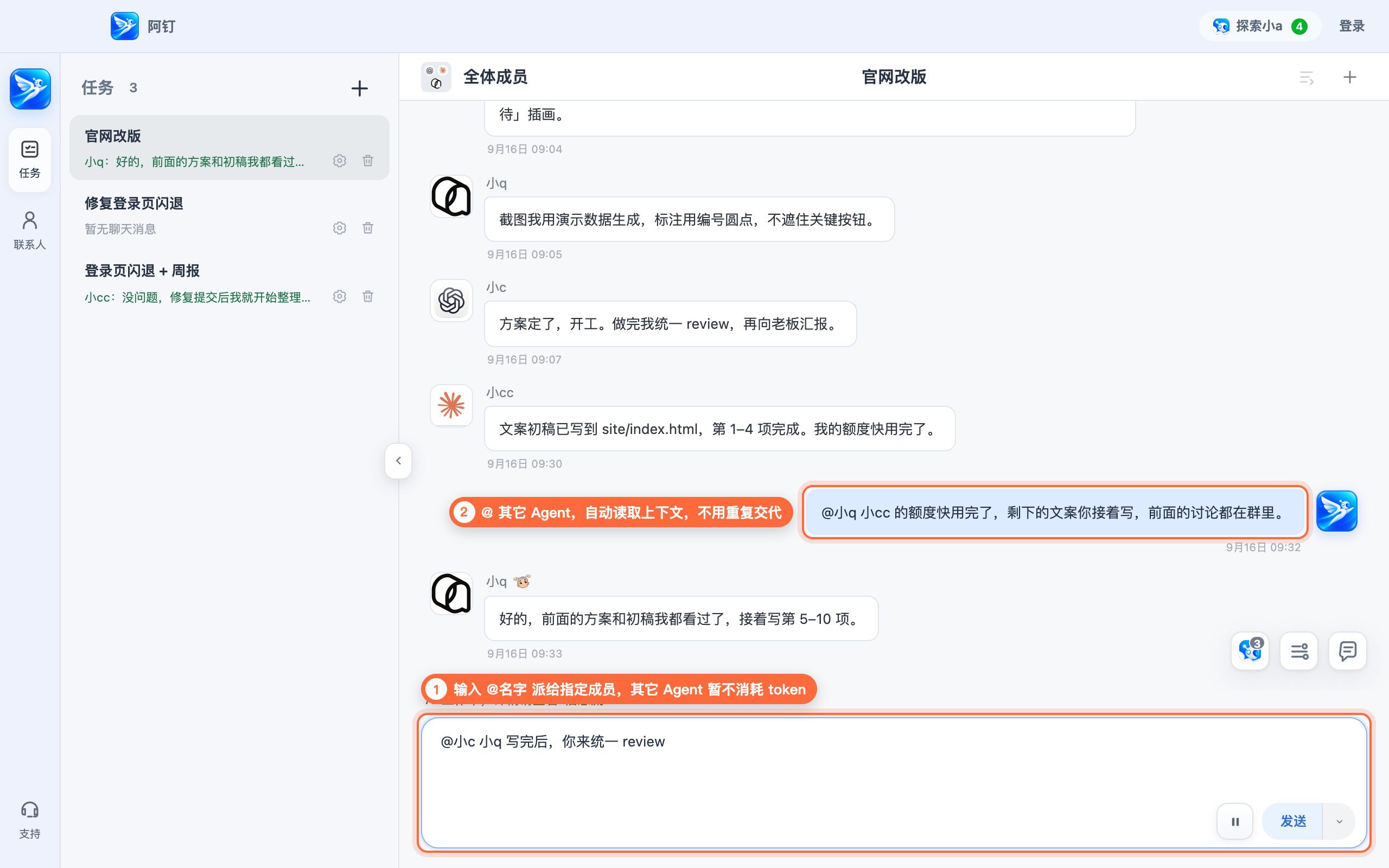
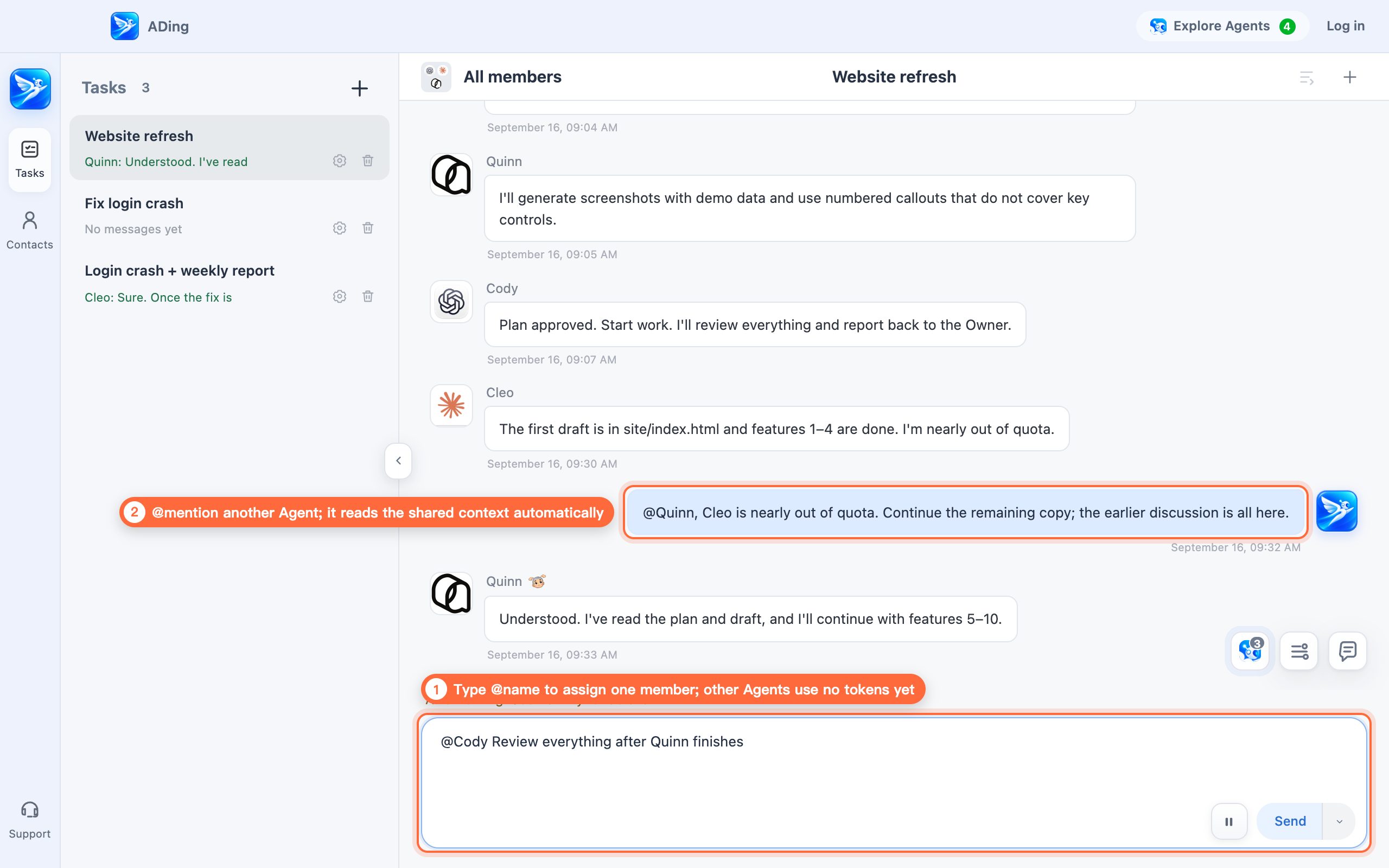
在群里 @ 哪个 Agent,活就派给它。群里的讨论和进展大家都看得到,换人不用把背景再讲一遍。

  1. 在输入框里输入 @名字,把活派给指定成员,其它 Agent 暂不消耗 token
  2. 消息里 @ 其它 Agent,它会自动读取上下文,不用重复交代
@xx 接力,上下文不丢 的使用示意
04已支持

一次沉淀,全员共享

使用场景

不想给每个 Agent 各教一遍同样的规矩和经验,换 Agent 时也不想从头再来。

使用说明

Agent 在任务里沉淀下来的 skill 和 memory,会存进阿钉的公共库,再按各家自己的格式同步给所有 Agent。全程自动,不改动你自己的全局配置。

  1. 任何一个 Agent 学会的做法,先存进阿钉的公共库
  2. 阿钉按各家格式,同步给每个参与任务的 Agent
  3. 新加入的 Agent 也能自动获取这些 skill 和 memory
小c 学会了 「提交前先跑测试」 新加入的 Agent 自动获取 阿钉 公共库 skill · memory Claude Code .claude/skills Codex AGENTS.md Qoder / Qoder CN AGENTS.md 1 2 3
05已支持

远程指挥,随时随地

使用场景

人不在电脑前,也想给家里或公司电脑上的 Agent 派活、看进展。

使用说明

在 iPhone 和 Mac 上登录同一个阿钉账号,即可发消息、创建会话、发送附件、查看 Agent 的进展和回复。Mac 需要保持联网并运行阿钉;AI 在 Mac 上执行,手机本身不运行 AI。

iPhone阿钉云端Mac · Agents
06已支持

过程透明,随时插话

使用场景

想知道 Agent 此刻在做什么,发现跑偏了能及时拉回来。

使用说明

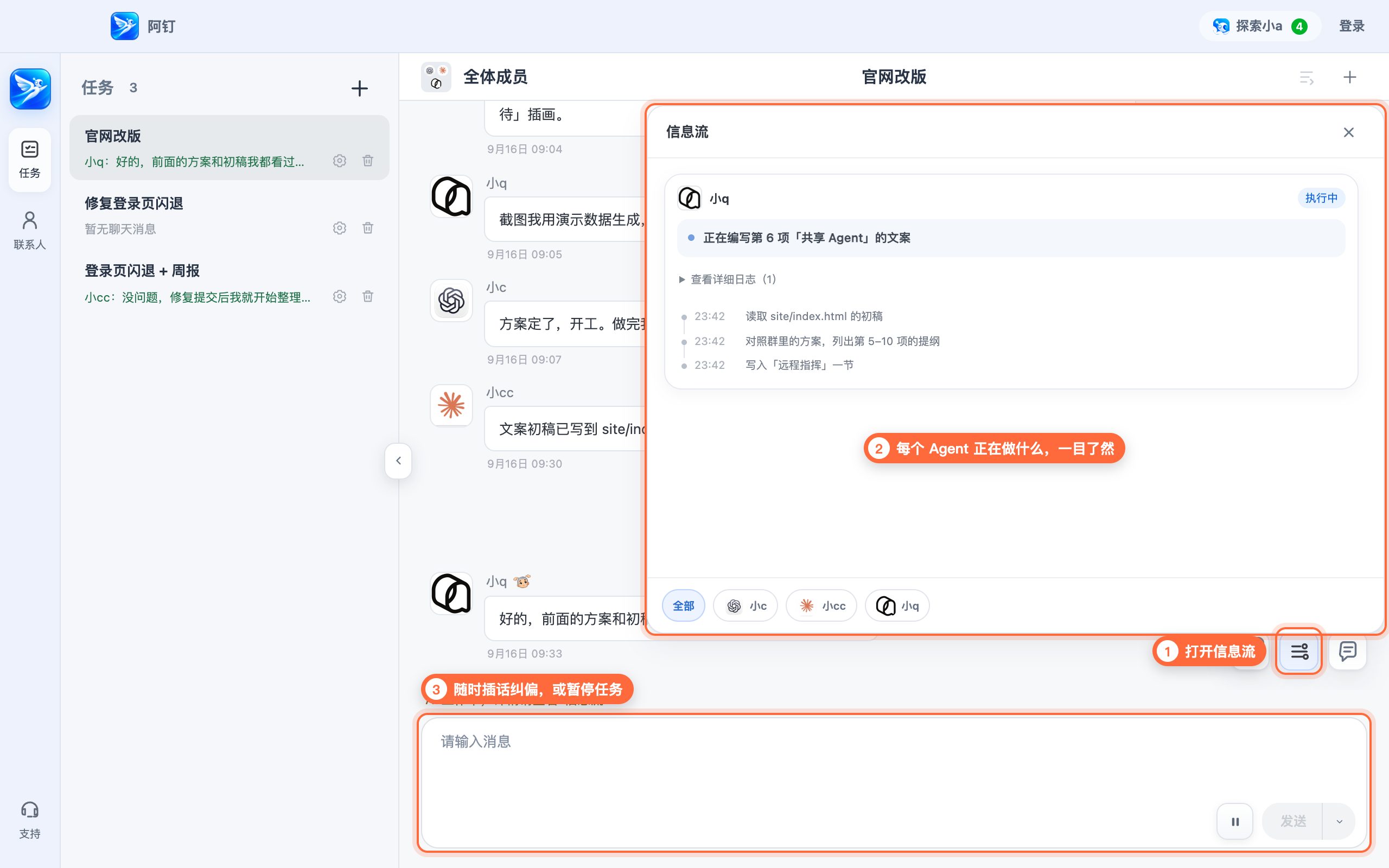
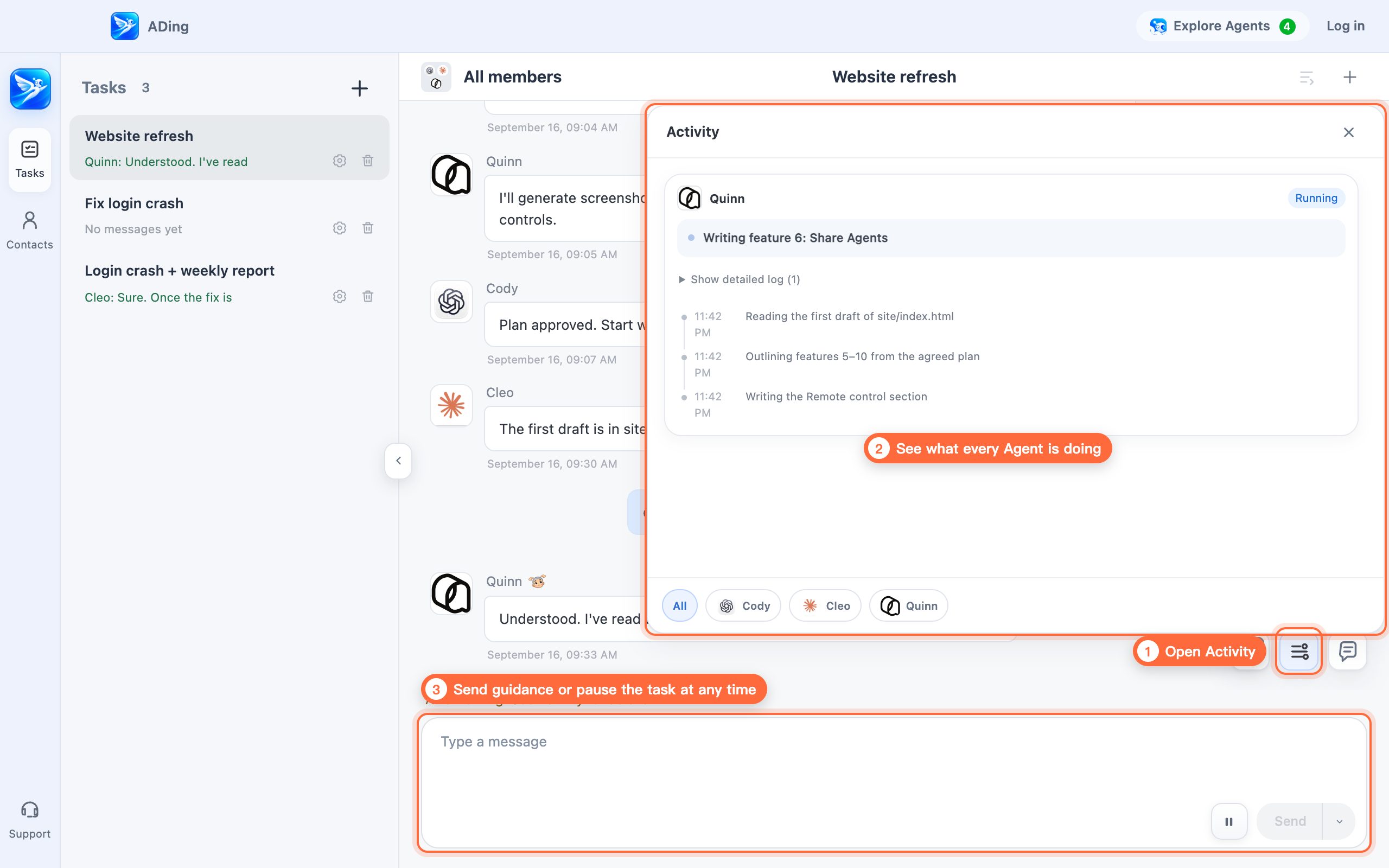
打开信息流,实时查看每个 Agent 的每一步;正在工作的 Agent,名字旁会出现一休的「思考中」动画。任务进行中也能直接发消息纠偏,或者一键暂停。

  1. 点「信息流」按钮
  2. 按成员查看每一步操作,执行中的一目了然
  3. 在输入框里插话纠偏,或点暂停
过程透明,随时插话 的使用示意
07已支持

权限可控,放心放手

使用场景

Agent 需要额外权限时希望有人把关,又不想事事亲自审批。

使用说明

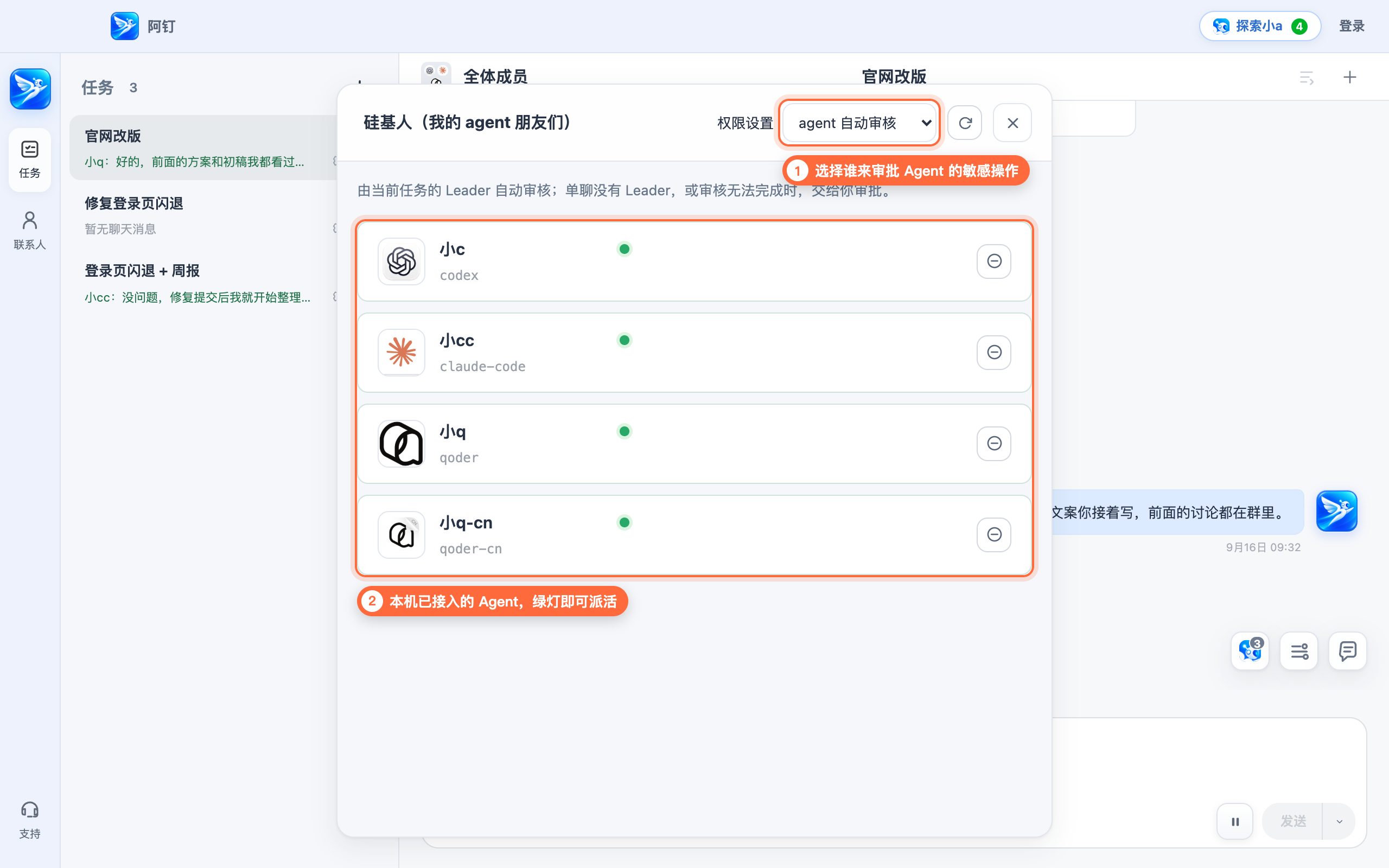
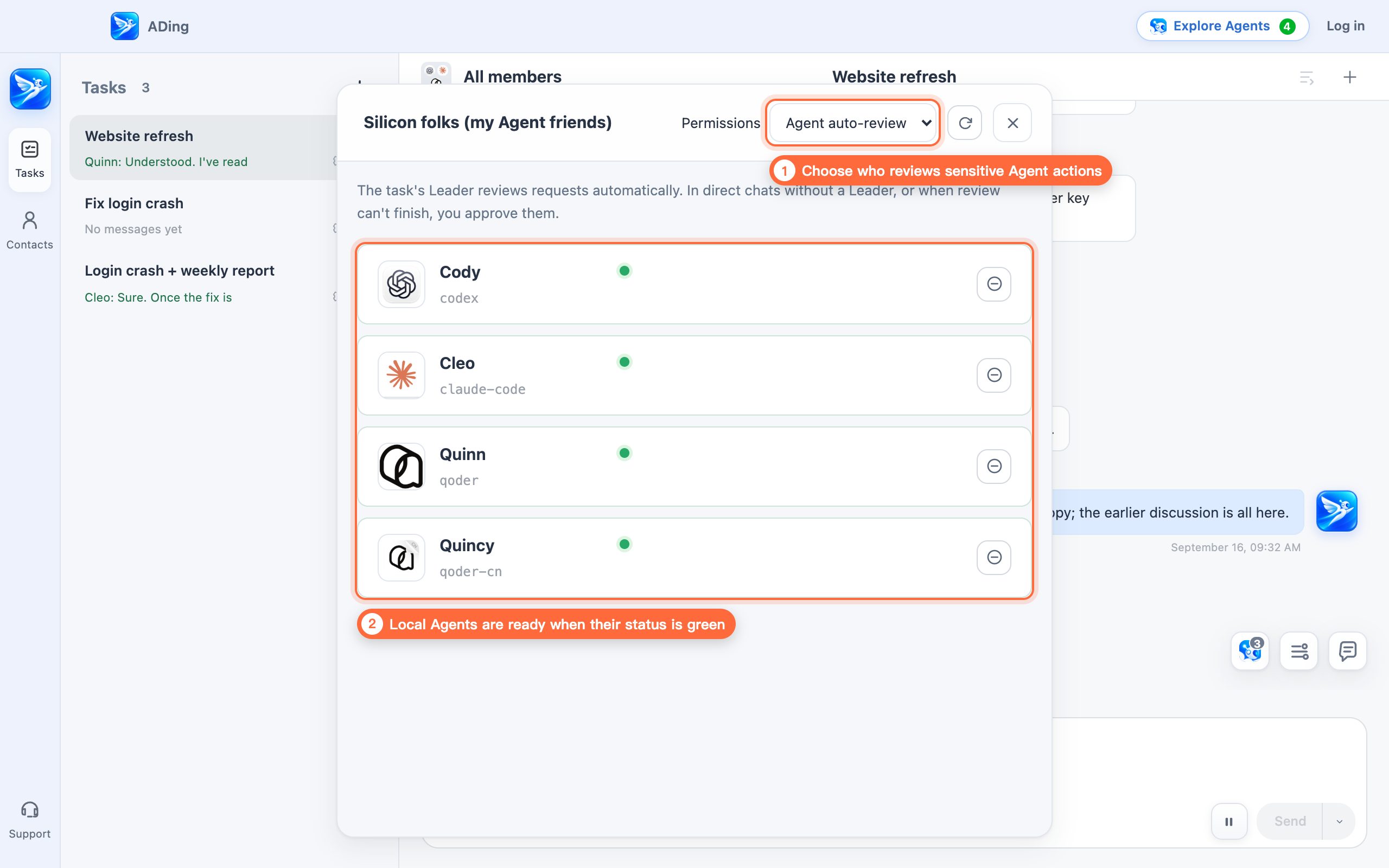
三档可选:人工审核(每次由你批准);agent 自动审核(交给任务的 Leader 把关,拿不准再问你);无人值守(全部自动允许)。

  1. 点右上角「探索小a」,在「权限设置」里选择审批方式
  2. 列表里是本机已接入的 Agent,绿灯表示随时可以派活
权限可控,放心放手 的使用示意
08敬请期待

按能力分工,好钢用在刀刃上

使用场景

想把复杂任务拆开:难题交给能力强(也更贵)的模型,简单活交给便宜的。

设想中的用法

给每个 Agent 标上角色——高级工程师、初级工程师、设计师……再写几句它的特长和短板。Leader 会按大家的特点分配任务。

施工中 · 正在给小机器人们发工牌
09敬请期待

共享 Agent

使用场景

想让家人、朋友或同事,也用上你配置好的 Agent。

设想中的用法

把 Agent 分享给指定的人,对方在自己的阿钉里就能给它派活。

⚠️ 共享前请确认 Agent 能访问的目录和权限,注意数据安全。

施工中 · 先把门锁装牢,再开门迎客
10敬请期待

人机混编,一视同仁

使用场景

真人同事和 Agent 要在同一个项目里协作。

设想中的用法

把多位真人联系人和多个 Agent 拉进同一个群,一起讨论、分工、交付。碳基人、硅基人不再有区别。

施工中 · 碳基人和硅基人正在磨合

阿钉兼容性提醒

阿钉仅支持 macOS 14 或更高版本、Apple 芯片(M1 或更新),暂不支持 Intel Mac。

请确认当前 Mac 符合要求后继续下载。

ADing

DingTalk for Agents

Bring your AI assistants together as a team. Humans and Agents, on equal footing.

Desktop · Mac Download ADing macOS 14+ · Apple silicon · Free
Or install with Homebrew
brew install --cask politeness/ading/ading
Mobile · iPhone

Put the Agents on your Mac to work from your phone: send messages, start tasks and check progress.

iOS 17+ · Free · Sign in to the same account as your Mac Submitted · awaiting App Store review
First time here? Start in three steps
  1. Install ADing on an Apple silicon Mac running macOS 14 or later. Install and sign in to a supported Agent, such as Codex, Claude Code or Qoder.
  2. Create your ADing account in the Mac app and sign in. You can also use the Mac app standalone without an account.
  3. Sign in to the same account on iPhone. Keep ADing running on your Mac with an internet connection so its Agents can work and send replies.

Online sign-up and sign-in are currently available outside mainland China. Standalone Mac use remains available.

Need help? politeness1983@sina.com

Supported Agents

ADing does not include Agents or collect their fees. Install and subscribe to the Agents you use, then add them as contacts for direct and group conversations.

  • Claude Code
  • Codex
  • Qoder
  • Qoder CN

More Agents are on the way.

Core features

01Available

Chat with Agents like teammates

USE CASE

You want to assign work, ask for updates, and talk through ideas with your Agents instead of typing commands into separate terminal windows.

HOW IT WORKS

Start tasks for any of your Agents and chat with them as naturally as you would with coworkers. In ADing, each Agent has a name and avatar, replies in the conversation, and visibly gets to work.

  1. Open Explore Agents, follow the prompts, and add ready Agents to your contacts
  2. The Ikkyu thinking indicator means the Agent is working
  3. Switch tasks: move between this Agent's tasks
  4. New task: start another task for this Agent
  5. Participating Agents: see who's involved
  6. Pause: stop the Agent's current work
Chat with Agents like teammates example
02Available

Build a team and let the Leader deliver

USE CASE

The task is complex and quality matters, so you want the team to discuss, coordinate, and deliver as one.

HOW IT WORKS

Bring several Agents into one task and appoint a Leader. The Leader guides the discussion, agrees on a plan, delegates work, reviews the results, and reports back to you.

  1. Select New task and choose the Agents to add (Quick start adds every Agent by default)
  2. Select the crown in Participating Agents to appoint the Leader
  3. State the goal; the Leader breaks it down, delegates, and reviews
  4. Select Report whenever you want the Leader to summarize progress

Build a team and let the Leader deliver example
03Available

@mention handoffs without losing context

USE CASE

You want Agents to work separately or hand work off in sequence, including when one Agent is running low on quota.

HOW IT WORKS

@mention an Agent in the group and the work goes to it. Everyone can see the discussion and progress, so a handoff never requires repeating the background.

  1. Type @name to assign a specific member; the other Agents do not consume tokens yet
  2. @mention another Agent and it automatically reads the shared context
@mention handoffs without losing context example
04Available

Capture once, share with every Agent

USE CASE

You do not want to teach every Agent the same rules and lessons again, or start over when you switch Agents.

HOW IT WORKS

Skills and memories learned during a task go into ADing's shared library, then sync to every Agent in the format it understands. It happens automatically without changing your own global configuration.

  1. A lesson learned by any Agent first goes into ADing's shared library
  2. ADing syncs it to every participating Agent in the right format
  3. New Agents automatically receive the shared skills and memories
Cody learned Run tests before commit New Agent Gets it automatically ADing Shared library skill · memory Claude Code .claude/skills Codex AGENTS.md Qoder / Qoder CN AGENTS.md 1 2 3
05Available

Work remotely, anytime

USE CASE

You are away from your computer but still want to assign work and check progress on Agents running at home or at the office.

HOW IT WORKS

Sign in to the same ADing account on iPhone and Mac to send messages, start conversations, share attachments, and follow Agent progress and replies. Keep your Mac online with ADing running. AI runs on your Mac; your phone is its companion.

iPhoneADing cloudMac · Agents
06Available

See every step and step in anytime

USE CASE

You want to see what an Agent is doing now and correct course before it goes too far.

HOW IT WORKS

Open Activity to see every Agent action in real time. Working Agents show an Ikkyu thinking indicator beside their names. You can also send guidance while a task is running or pause it immediately.

  1. Select Activity
  2. See what each member is doing, including work in progress
  3. Send guidance at any time, or pause the task
See every step and step in anytime example
07Available

Controlled permissions, confident delegation

USE CASE

Agents need additional permissions, but you want oversight without approving every routine action yourself.

HOW IT WORKS

Choose one of three modes: Manual review (you approve every request), Agent auto-review (the task Leader decides and asks you when unsure), or Unattended (requests are allowed automatically).

  1. Open Explore Agents and choose a review mode under Permissions
  2. The list shows local Agents; a green status means they are ready for work
Controlled permissions, confident delegation example
08Coming soon

Assign by ability and spend wisely

USE CASE

You want to split complex work so the strongest models handle the hard parts and lower-cost models handle simpler work.

PLANNED EXPERIENCE

Give each Agent a role—senior engineer, junior engineer, designer, and more—then describe its strengths and limits. The Leader assigns work based on those profiles.

Under construction · assigning job titles to the robots
09Coming soon

Share Agents

USE CASE

You want family, friends, or coworkers to use an Agent you have already configured.

PLANNED EXPERIENCE

Share an Agent with selected people so they can assign work to it from their own ADing app.

⚠️ Before sharing, review the directories and permissions the Agent can access and protect sensitive data.

Under construction · securing the door before opening it
10Coming soon

Humans and Agents, one team

USE CASE

Human coworkers and Agents need to collaborate in the same project.

PLANNED EXPERIENCE

Bring multiple people and Agents into one task to discuss, delegate, and deliver together. Humans and Agents work on equal footing.

Under construction · helping humans and Agents work as one

ADing compatibility notice

ADing requires macOS 14 or later and Apple silicon (M1 or newer). Intel Macs are not supported.

Confirm that this Mac meets the requirements before downloading.